JuaraKu
Step 8 of 9
89%
Upgrade your game
If you have time, you can add more levels and more distractions to your game. You could also change the sprite that is hiding and change the text on the chalkboard.
Play your game and see how quickly you can find the bugs.
Is there someone else who can try your game? How fast can they find the bugs? They will not know where you have hidden them, so it might take them a bit longer!
Is there anything that you want to change?
You could:
- Make the parrot even more annoying
- Make the bugs smaller
- Change the color effect to camouflage the bug on each level
- Change the font or colour of the text
Add more levels
Here are the blocks that you will need to hide the bug on a new level:
when backdrop switches to [new level v]

set size to [20] %

go to x: [0] y: [0] // drag to position the bug first

set [color v] effect to [50]
For each level, you will need to:
- Add a backdrop
- Click on the Stage pane, then on the Backdrops tab, then drag the new backdrop into position before the end backdrop
- Add a when backdrop switches to block for the new backdrop and add code to position and hide the bug
Tip: To drag the bug to a new hiding position, you will need to 'break' the code so that the backdrop does not switch when you click on the bug to position it for a new level.
Add more distractions
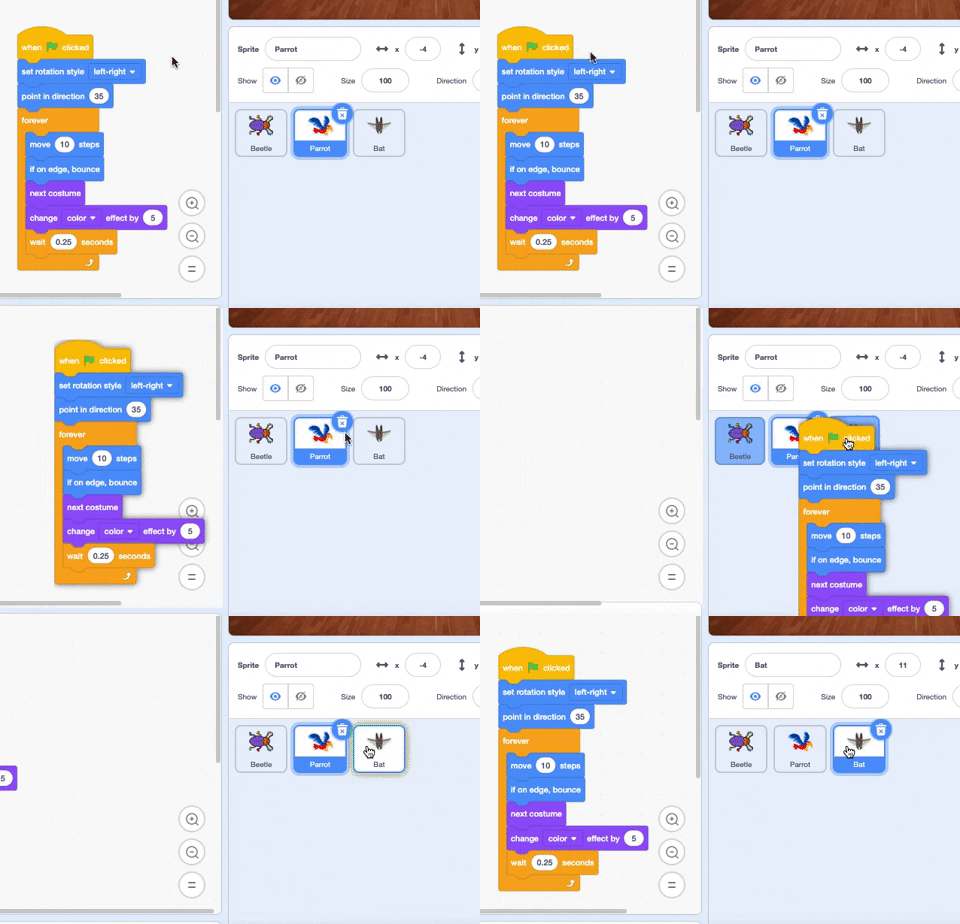
You could add more parrots or choose another sprite to act as a distraction.
Here is the code that you used for the parrot:
when flag clicked
set rotation style [left-right v] // do not go upside down
point in direction [35] // number from -180 to 180
forever // keep being annoying
move [10] steps // the number controls the speed
if on edge, bounce // stay on the Stage
next costume // flap
change [color v] effect by [5] // try 11 or 50
wait [0.25] seconds // try 0.1 or 0.5
end
Tip: You can drag the Parrot sprite's code to another sprite to make it faster to create another distraction sprite.